
Introduction
Simplifier.net, Forge and Firely Terminal come with a Quality Control Engine to help you improve the quality of your FHIR projects. The QC engine performs a series of rule checks on selected files in your project, on your local computer, or on every change to your source code repository. By default there are three rule series (free, minimal and recommended) that you can run on your project (described below), but you can also define your own rules.

Quality Control being executed on a project
On Simplifier, the output is saved in the Issues tab at the project level. You can filter on Quality Control there to see the issues found.
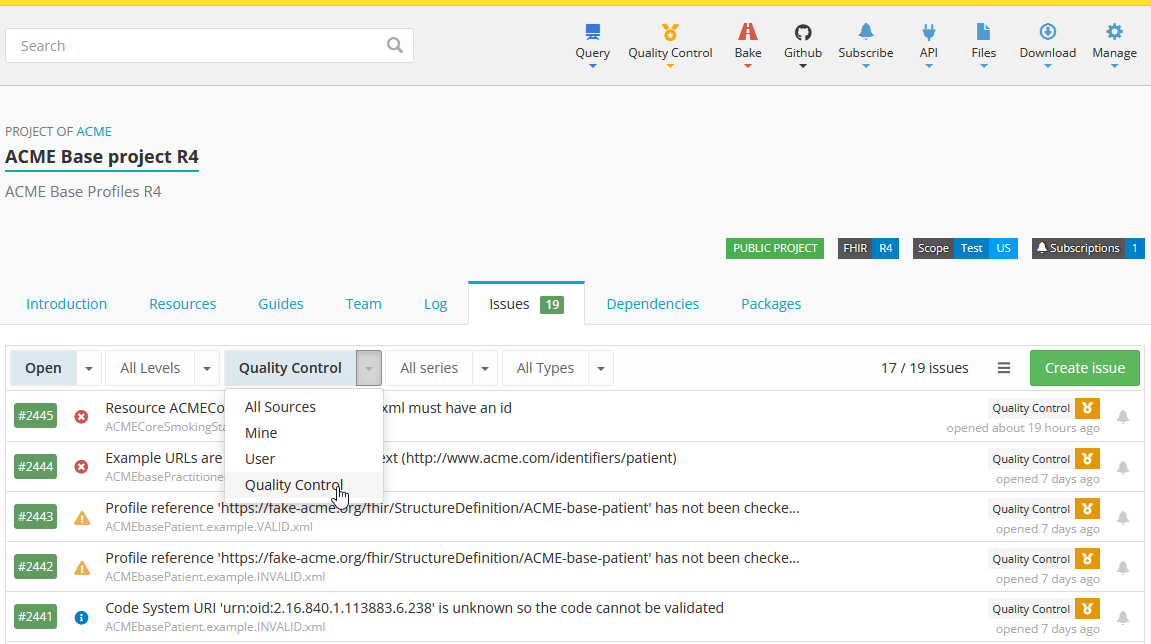
Following one of the core principles of Simplifier, eating your own dogfood, you use the same language (YAML) that we used for the defaults to define your own rules. This way we share the experience and deal with the same challenges that you would face as a user. It is the same reason we write all our documentation in the Simplifier Implementation Guide editor.
Rule files
You can add *.rules.yaml files to your project. All rules files in the root are exposed in the Quality Control menu of your project, so that any authorized user can run them. You get all the power of the FHIR Compute Cloud behind Simplifier to run these checks.
File format: a YAML rules file is named <name>.rules.yaml. A ruleset file consists of entries; each entry starts with a dash, followed by a series of indented key-value pairs. (The comments below are not part of the entry; they just describe how to read it.)
# comment for first entry
- first: value
  second: value
  third: value

# comment for second entry
- first: value
  second: value
  third: value
Default rule set: Simplifier provides a default rule set, accessible to every project: default.rules.yaml. If you do not wish to use the default rules, you can provide your own version of default.rules.yaml.
Custom rule sets: you can add other rule files to your project, as long as their name follows the pattern <name>.rules.yaml. It does not matter where you place them; they are all discovered by the system and exposed in the Quality Control menu.
Running individual sets: in Simplifier and Firely Terminal you can run individual rule sets, in which case the default set and other sets are not run. You can include other rule sets in a rules file with the include action.
Default rule series
Simplifier provides three default rule series: free, minimal, and recommended. Each series builds on the previous one.
Free series: available to all users. It checks whether resources can be parsed as FHIR resources, whether they include an .id element, and whether a version is set. That last check supports canonical pinning during release (see Pinning).
- action: parse
  name: parse-fhir-resources
  status: "Checking if all FHIR Resource files can be parsed"
  files:
    - /**/*.xml
    - /**/*.json
    - "!package.json"
    - "!fhirpkg.lock.json"

- name: id-mandatory
  status: "Checking if all resources have an id"
  predicate: id.exists()
  error-message: "Resource {{filepath}} must have an id"

- name: explicit-version
  predicate: version.exists() = false
  status: "Checking for resources with an explicit version"
  severity: info
  error: EXPLICIT_VERSION
  error-message: This resource has an explicit version, which Simplifier will not overwrite during package creation. Verify that this version is correct and intentional, as it will differ from the package version.
Minimal series: a small set of rules that we know everyone agrees on. It adds bulk validation, which is one of the most extensive forms of validation, so in that respect the minimal series is not small; it is, however, what the FHIR standard describes that resources should adhere to.
# This is the minimal rule series

- action: parse
  name: parse-fhir-resources
  status: "Checking if all FHIR Resource files can be parsed"
  files:
    - /**/*.xml
    - /**/*.json
    - "!package.json"

- name: explicit-version
  predicate: version.exists() = false
  status: "Checking for resources with an explicit version"
  severity: info
  error: EXPLICIT_VERSION
  error-message: This resource has an explicit version, which Simplifier will not overwrite during package creation. Verify that this version is correct and intentional, as it will differ from the package version.

- name: resource-validation
  status: "Validating resources against the FHIR standard and their profiles"
  action: validate
  category: Resource
  suppress:
    - 6005
    - eld-16

- action: unique
  name: unique-canonicals
  status: "Checking if all StructureDefinitions have a unique canonical"
  category: StructureDefinition
  unique: url

- include: manifest
Recommended series: a more opinionated set of rules, of what we believe a FHIR project should conform to. We acknowledge that these are more opinionated, so we separated them. It includes the minimal series and adds rules such as the ones below.
- include: minimal

- name: no-snapshot
  status: "Checking that structure definitions do not have a pre-generated snapshot"
  category: StructureDefinition
  predicate: snapshot.element.count() = 0
  error-message: You should not generate a snapshot in your source. Allow consuming tools to generate the snapshot.

- name: valid-ids
  status: Check for valid ids
  predicate: id.matches('^[A-Za-z0-9\-\.]{1,64}$')
  error-message: The resource must have a valid id

- name: valid-names
  category: StructureDefinition
  predicate: name.contains(' ').not()
  error-message: The name of a StructureDefinition should not contain spaces

- name: unique-names
  category: Conformance
  unique: name